
How to Choose Project Management Software When Excel Is No Longer Enough
Excel, Gantt, Monday, MS Project… Hundreds of project management tools exist. But which one is actually built for managing multiple projects with shared resources? A selection guide for SMEs and engineering firms.
Hundreds of tools. And yet, projects still slip.
It has never been easier to find project management software. Comparison articles are everywhere, free trials are plentiful, and the promises all sound the same: real-time collaboration, dynamic dashboards, Kanban views, Gantt views, dozens of integrations.
And yet.
Project managers, SME executives, and engineering firm directors continue to juggle projects with a persistent sense of unease. Deadlines slip. Resources are overwhelmed. Priorities get set by gut feeling. And somewhere, a spreadsheet is still quietly doing its thing, because "it's still practical for consolidating data."
The problem is not a lack of tools. It is that most existing tools are not designed for the real problems of organizations managing several parallel projects with shared resources.
This guide is here to make sense of the market, understand why some tools fall short, and identify what truly matters when making a choice.
The Excel paradox: everyone criticizes it, everyone still uses it
Let's start here, because it is often the honest starting point for many organizations.
Excel is not a bad tool. It is actually an excellent tool — for what it was designed to do: tables, calculations, budgets, data analysis. It is flexible, familiar, and powerful as a spreadsheet.
The problem is that Excel is static.
When you build a schedule in Excel, you are taking a snapshot of the situation at a given moment. You set dates, milestones, and resources. It looks clean, structured, reassuring. But as soon as something changes — a task running late, a resource unavailable, an urgent client project forcing its way in — the file does not recalculate. You have to redo everything by hand.
In a multi-project context, this limitation quickly becomes a wall.
What Excel cannot do
Excel does not detect resource conflicts across projects. It does not automatically recalculate cascade impacts. It does not tell you which project to prioritize. It documents a past situation — it does not steer a current one.
The most common symptom: you spend more time maintaining your tracking file than making decisions based on it. The schedule becomes an end in itself rather than a management tool.
Why your projects slip despite careful tracking — an article that explores the structural causes of this drift.
The real cost of Excel in a multi-project context
Beyond update time, Excel generates a less visible but equally real cost: the cost of ambiguity.
When your tracking file is out of sync with the reality on the ground — because it needs to be redone, because nobody had time, because the data is spread across three different tabs — steering meetings become update meetings. You spend the first hour figuring out where things stand, and the second hour wondering what to do. The decision itself waits.
And in organizations managing five, ten, or twenty parallel projects, this ambiguity compounds. Each project has its own file. Each project manager has their own view. There is no consolidated view, no shared reading, no common priority.
This is precisely where the need for a real steering tool becomes unavoidable.
The Gantt: useful, but incomplete once projects multiply
After Excel, the natural next step is planning software with a Gantt view. And it is genuinely a step forward: task dependencies are represented, the schedule updates automatically, milestones are visible.
But the Gantt has a structural limitation that many organizations discover too late.
It thinks one project at a time.
A Gantt chart shows your project A looking perfectly fine. Your project B too. But it does not tell you that Sophie, your most experienced engineer, is allocated to both projects simultaneously, on critical tasks that overlap. It does not tell you that if project A slips by one week, project C — which depends on a deliverable from project A — will shift by three weeks.
A classic Gantt has no portfolio vision. It does not help estimate durations realistically (accounting for variability and multitasking). It does not help you decide what to prioritize when everything seems urgent.

What Gantt does well

What Gantt does poorly

What Gantt does not do
For a deeper dive: Why Gantt becomes unreliable in multi-project environments.
The estimation and multitasking problem
The Gantt has another blind spot, less often discussed: it does not solve the problem of duration estimation.
In most organizations, task durations are estimated optimistically — "if everything goes smoothly, it will take two days." Each person mentally builds in a small safety margin. The result: the schedule is built with safety margins scattered everywhere, but they all evaporate before they can be useful.
The reason? The student syndrome: people wait until the last moment to start, because they are busy with something else. And that "something else" is multitasking — switching between projects, responding to urgent requests, juggling contradictory priorities. Multitasking kills productivity and stretches deadlines, but the Gantt does not see it. It assumes each resource works on one task at a time, at 100% capacity, without interruption.
The reality of an SME or engineering firm is radically different.
What multitasking really costs
A resource juggling three simultaneous projects does not produce three times more. They produce less on each one, with transition time accumulating and deadlines stretching across the board. A steering tool must integrate this reality, not ignore it.
The project management software market: a map to navigate it
The market is vast and heterogeneous. Here is how to read it without getting lost.
Collaboration and task tracking tools
Monday.com, Asana, Notion, ClickUp, Trello…
These tools are excellent at what they do: organizing team work, tracking tasks, centralizing communication, managing workflows. They are intuitive, visually appealing, and respond well to simple project management needs or team coordination.
Their limitation: they are not designed for managing complex projects with resource constraints. They have no native concept of shared resources, protective buffers, or calculated priorities across projects. They are work visibility tools, not project steering tools.
Expert planning tools
Microsoft Project, Primavera P6…
These tools are powerful, comprehensive, and designed for professional project managers in large organizations. MS Project handles complex projects with resources, costs, and detailed dependencies. Primavera is the standard for large-scale engineering and construction.
Their limitation for an SME or engineering firm: the learning curve is steep, meaningful use requires serious training, and the tool often assumes there is someone whose full-time job is scheduling. If you are a project manager who also handles your team, clients, and deliverables, MS Project can become a burden rather than an aid.
High-end portfolio management platforms
Planisware, Sciforma, SAP PPM…
These platforms are designed for large project management offices in industrial groups or multinationals. They integrate governance modules, project finance, risk management, and large-scale HR capacity planning. They are robust, but implementation takes months and costs hundreds of thousands.
For an SME, clearly oversized.
Specialized CCPM tools
LYNX by A-dato, Aurora-CCPM, Realization…
These tools natively integrate the critical chain method (CCPM). They automatically calculate buffers, track their consumption, and manage priorities across projects according to proven methodological rules.
LYNX, for example, is used by organizations like Airbus, Bosch, and Zeiss. It is an enterprise-grade tool, with skill modeling based on the ISA-95 standard, a Scenario Wizard to simulate the introduction of new projects, and Agile/Kanban integration. Powerful — but clearly designed for dedicated PMOs in large organizations with specialized steering teams.
For an SME or engineering firm without a dedicated project department, the configuration complexity can become a real obstacle.
The 5 criteria that actually make a difference
Before choosing software, ask yourself these five questions. They will help you avoid the classic traps.
| Criterion | The right question to ask |
|---|---|
| Shared resource management | Does the tool automatically detect when the same resource is overloaded across multiple projects? |
| Portfolio view | Can I see at a glance the health of all my projects, and which one deserves priority attention? |
| Decision support | Does the tool tell me what to do, or does it merely show me what is happening? |
| Ease of use | Can I be operational without days of training or an external consultant? |
| Schedule realism | Does the tool help me estimate durations realistically, accounting for variability and multitasking? |
The trap of the over-featured tool
A tool with 200 features is only useful if you use 20 of them. The risk for SMEs and engineering firms: choosing an impressive tool during the demo, then abandoning it six months later because it is too complex to maintain day-to-day.
Why the method behind the tool matters as much as the tool itself
This is the point many software buyers overlook.
A project management tool is not neutral. It embodies a steering logic. And depending on which logic it embodies, it will — or will not — help you make better decisions.
Tools based on a simple Gantt give you a visual representation. They do not help you prioritize, nor do they help you protect your deadlines against uncertainty.
Tools based on the critical chain (CCPM) go further: they identify the sequence of tasks that truly determines the project end date (accounting for resources, not just dependencies), they calculate a time buffer to absorb unexpected events, and they track the consumption of that buffer to alert you before it is too late.
The difference is not cosmetic. It fundamentally changes how you steer.
What the critical chain changes in practice
Take a simple example. You manage an engineering firm with four active projects. A client calls about an urgent change order on project C. You need to decide whether to accept it, and on what terms.
With a classic Gantt tool, you open the four schedules, try to see where your engineers are, mentally calculate the cascade impacts, and call a meeting to discuss it.
With a tool integrating the critical chain, the answer is immediately visible: project C is at 40% buffer consumption. The engineer available for the change order is already on the critical chain of project A. Accepting without renegotiating project A's deadline will put that project at risk. The decision is clear, quantified, and defensible with the client.
This shift — from intuition to informed decision — is what critical-chain-based steering tools make possible.
Understanding the difference between critical chain and critical path — for a deeper dive into the method.
KairoProject: a steering tool built for those who have no time for steering
KairoProject is a project management tool that natively integrates the critical chain method — without requiring you to know this method to benefit from it.
The core idea is simple: you should not have to search for the information that matters. It should be presented to you, directly, without calculation, without debate, without digging through menus.
Three panels. One decision.
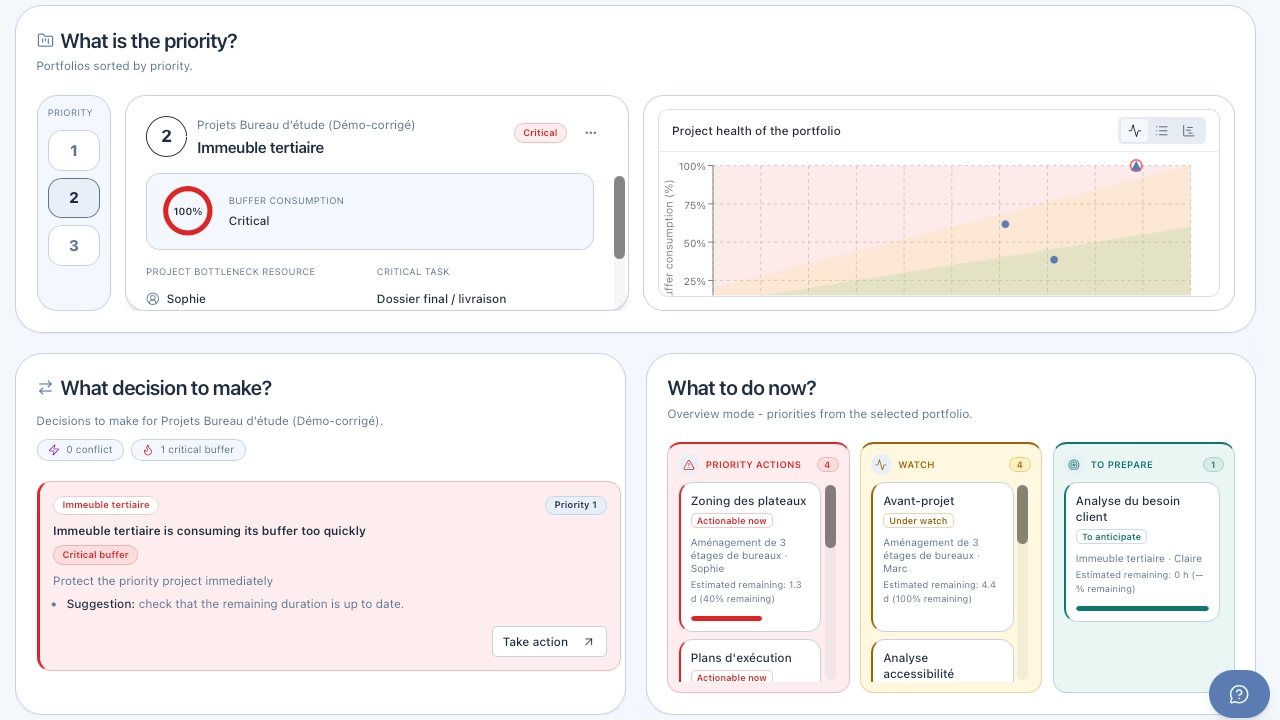
The KairoProject dashboard is organized around three complementary views:
- The portfolio view — All your projects, ranked by tension. You immediately see which is healthy, which is under pressure, which is in danger.
- The project view — For each project, the critical chain is identified automatically. The protective buffer is calculated. Its consumption is tracked in real time.
- The resource view — Who is overloaded? On which project? Which task is creating the conflict? The answer is visible with no manual calculation.
What KairoProject does differently
KairoProject is not just another planning tool. It is a decision-support steering tool.
The distinction matters. A planning tool shows you where you stand. A steering tool tells you what to do.
What most tools do

What KairoProject does
Built for SMEs and engineering firms without a dedicated PMO
KairoProject does not assume there is a planning expert on your team. It is designed so that the project manager, the executive, the engineering office director — who also handles clients, teams, and deliverables — can steer correctly without spending their whole day on it.
No three-day training course. No consultant to configure the tool. No methodology to master before starting.
The critical chain works in the background. You see the result.
Design assistance: an often underestimated advantage
A good steering tool does not start when the project is launched. It starts when you structure it.
KairoProject integrates AI assistance for project creation: from a text description of your project — its objective, main phases, and resources involved — the tool generates a task structure with duration estimates. It is not a definitive schedule, but it is a realistic starting point rather than a blank page.
For organizations that regularly create similar projects — an engineering firm starting a new client file, an SME launching a new product line — this templating and duplication capability significantly accelerates getting started.
What you see on the first morning
The concrete question when choosing a tool is: what will I see when I open it tomorrow morning?
With KairoProject, the answer is:
- the project that deserves your attention today, automatically identified by buffer tension level;
- overloaded resources, visible without any calculation;
- blocked tasks and the documented causes of each blockage;
- the real progress of each project, measured on remaining work, not on self-reported percentages.
No compiling, no cross-referencing tabs, no report to prepare. The information is there, structured, actionable.
Project management: too much information, not enough clarity to decide — why visibility alone is not enough, and what useful information really means.
Summary table: which tool for which context?
| Tool / Category | Strengths | Limitations | Ideal for |
|---|---|---|---|
| Excel | Flexible, familiar, free | Static, no resource management, no multi-project view | Reports, budgets, one-off analysis |
| Simple Gantt (ProjectLibre, GanttPRO…) | Clear visualization of one project | No multi-project, no shared resources | One isolated project, small team |
| Collaboration (Monday, Asana, Notion…) | Intuitive interface, teamwork | No resource steering, no calculated priority | Team coordination, simple projects |
| Expert planning (MS Project) | Powerful, comprehensive | Complex, long to master, requires an expert | Large organizations, dedicated project managers |
| Enterprise CCPM (LYNX) | Rigorous method, advanced multi-project | Complex to configure, built for PMOs | Large organizations, dedicated steering team |
| KairoProject | Integrated CCPM, 3-panel decision view, simple | No advanced budget management | SMEs, engineering firms, multi-project without PMO |
FAQ: common questions before choosing
No. KairoProject integrates critical chain logic in the background. You benefit from its effects — calculated priorities, tracked buffer, visible tensions — without having to master the method. It is precisely designed for teams without a project management specialist.
For project steering: yes, and significantly. Excel remains relevant for your financial dashboards, billing reports, and data analysis. But for tracking the progress of multiple projects with shared resources, anticipating delays, and deciding on priorities, a dedicated tool changes the situation fundamentally.
Most teams create their first project in under an hour. KairoProject's AI can generate a project structure from a text description, which further accelerates onboarding. A guided demo allows you to see concretely what the tool can bring to your specific context.
Yes. Engineering firms are precisely the context KairoProject was designed for: multiple parallel projects, shared technical resources (engineers, drafters, project leads), contractual deadlines to meet, and often no dedicated PMO. The portfolio view and resource conflict management directly address these challenges.
Warning signs that your current tool is no longer enough
Sometimes the need to change tools is not obvious at first glance. Here are the concrete signals that indicate it is time to reassess your steering setup.
- Your steering meetings always start with "where do we stand?" — If you spend the first part of every meeting updating the situation rather than making decisions, your tool is not doing its job.
- You cannot tell, without searching, which project is most at risk — The answer to this question should be visible in five seconds. If it requires analysis, you lack portfolio visibility.
- Your resources always seem overwhelmed, but you cannot say on what — Overload is visible in behaviors (delays, disengagement, constant urgencies), but it is nowhere quantified or located in your tool.
- Your schedule is always "correct" but your deadlines systematically slip — This is the classic sign of a tool that models an ideal world without accounting for real variability and resource conflicts.
- Each project manager has their own version of reality — No shared view, no common priority, no shared language for arbitration. The tool fragments rather than aligns.
If you recognize yourself in at least three of these situations, the problem is not your team. It is the tool.
Before signing a subscription or launching a deployment, ask yourself these three questions honestly.
- 1
What is my real problem? If your problem is coordinating a team on one project, a collaboration tool will do. If your problem is steering multiple projects with shared resources and deciding on priorities, you need a multi-project management tool.
- 2
Who will use the tool on a daily basis? A tool nobody uses is worthless. If your team has no planning specialist, choose a tool that does not require expertise to deliver value.
- 3
What do I want to see when I open the tool in the morning? The answer to this question determines everything. If you want to see "which project deserves my attention today and why", the tool must give you that answer immediately, without calculation.
In summary
The project management software market is rich but uneven when it comes to the real needs of SMEs and engineering firms. Excel is static. Collaboration tools lack depth for steering. Expert tools are powerful but complex. Enterprise platforms are oversized.
What is often missing is a tool that integrates genuine multi-project steering logic — with resource management, calculated prioritization, and decision support — without assuming there is a full-time expert behind it.
That is exactly what KairoProject is built to be.
If your technical team still stacks Excel, a Gantt chart, and Jira, this article details what actually changes when you switch to priority-based steering, without losing anything of your Agile setup.
Project management: too much information, not enough clarity to decide — to understand why visibility alone is not enough.
2 minutes · personalized result
Newsletter
Want to go further?
Get regular, actionable takes on multi-project prioritization, the Critical Chain, shared resource constraints, and steering practices.
Read next
Why Your Gantt Chart Becomes Unreliable the Moment Your Projects Share the Same Resources
Gantt charts work well for isolated projects. They become misleading the moment multiple projects compete for the same people. Here is why, and what to look at instead.
Your schedule may be perfectly correct — and your project will still be late
Critical chain and critical path look similar but drive very different project realities. Understanding the difference changes how you manage projects for good.
Why projects slip even when everyone is working hard
An operational reading of delays when priority, flow, and the constraint remain implicit, with a real-world agency case and an actionable decision framework.
Project Steering: Too Much Information, Too Little Clarity to Decide
Full dashboards, weekly status updates, regular meetings — and yet decisions remain unclear. A real-world construction case and a method for surfacing the information that actually steers a project.
Excel, Gantt, Jira… and Still Late: What Changes When You Steer by Priority
Your team juggles Excel, a Gantt chart, and Jira but sprints still slip? Here's what actually changes when you steer a project portfolio by priority instead of by tool.