
Agile and Critical Chain: Keep Your Sprints, Finally Hit Your Deadlines
How to combine Agile Scrum and Critical Chain (CCPM): which IT projects benefit, why sprints alone do not protect the delivery date, and how KairoProject links every sprint closure to the project buffer.
The sprint 6 retrospective goes well. The team delivered what it promised, the demo landed, the mood is good. Then the project director asks a simple question: "And the March 15 go-live, are we still on track?"
Nobody can answer. Every sprint has been on time, one after another. But the backlog has grown, two developers were pulled onto another project for a week, and user acceptance testing still has no realistic date. Every sprint is on time, and yet the project is slipping.
This is not a failure of Scrum. It is a question Scrum was never designed to answer on its own: how do you protect a delivery date when the content of the work changes sprint after sprint?
What you will find in this guide
Why Agile and Critical Chain are not opposites, which projects benefit from combining them, and how KairoProject connects every sprint to the project schedule without changing how your team works day to day.
What Scrum does very well, and what it does not promise
Agile methods have deeply improved how software projects are run. The Standish Group's CHAOS Report 2015, which analyzed thousands of IT projects carried out between 2011 and 2015, found 39% of agile projects successful versus 11% of waterfall projects.
Scrum, the most widely used agile framework, rests on a few simple principles described in Ken Schwaber and Jeff Sutherland's Scrum Guide (2020 edition):
- work is split into sprints, fixed-length periods of one month or less;
- each sprint pursues a goal (the Sprint Goal);
- the sprint end date does not move: what varies is how much work gets done;
- the approach is empirical: you look at what actually happened, then adapt.

A steady rhythm
Frequent feedback

A self-managing team
Where Scrum stops
Scrum protects the length of the sprint. It provides no mechanism to protect the final date of a project, nor to arbitrate between several projects competing for the same people.
Marris Consulting, a French firm specializing in Critical Chain, sums up the situation in its presentation on IT projects: agility brings team responsiveness and autonomy, but it does not guarantee control over schedule dependencies or team workload.
Yet that is exactly what most IT projects in an SME or engineering firm need: a go-live date promised to the client, acceptance testing to schedule with their teams, a data migration that depends on a vendor, and developers who also work on other projects.
What Critical Chain adds: protect the date, not every task
Critical Chain Project Management (CCPM) was introduced by Eliyahu Goldratt in Critical Chain (1997). It starts from one observation: the safety margins hidden in every estimate do not protect the project. They get used up locally, task by task.
CCPM therefore relies on:
- lean estimates, with no hidden margin;
- a single buffer at the end of the project, protecting the delivery date;
- tracking by remaining work: "how much work time is left from now on?", rather than a declared percentage of completion;
- reading project health on the fever chart, which compares progress with buffer consumption.
If these ideas are new to you, our complete guide to CCPM walks through them step by step, and our article on the safety margins hidden in schedules explains why they disappear so fast.
Two methods, one meeting point
At first glance, Scrum and Critical Chain are not talking about the same thing. One organizes a team's work. The other protects a project's date. That is precisely why they complement each other.
| Topic | Scrum | Critical Chain |
|---|---|---|
| What is fixed | Sprint length | Protection of the project date (the buffer) |
| What varies | Work completed in the sprint | Buffer consumption |
| Progress measure | Goal reached, work "done" | Remaining work |
| When to re-estimate | End of every sprint | Every remaining-work update |
| Final date protection | No built-in mechanism | Project buffer |
The last row shows what Scrum lacks. The "when to re-estimate" row shows what they share: at the end of a sprint, the team honestly looks at what happened. Critical Chain needs exactly that information, the remaining work, to measure buffer consumption.
What the TOC literature says
Wolfram Müller, a former PMO head and Theory of Constraints consultant, put it this way at the TOCICO 2020 worldwide conference: "a work package in CCPM is equivalent to a release in Agile." He describes a three-layer system: the portfolio, the project, and the agile team. Marris Consulting applies the same logic in its IT engagements: Critical Chain for schedule and capacity, Agile for team flexibility.
In other words, this is not about choosing between two parallel methods. Critical Chain steers the project and the portfolio; Scrum nests inside, at the level of a work package. Our article Excel, Gantt, Jira… and still late shows this shift from the portfolio's point of view. This guide shows how it actually works, sprint after sprint.
Which projects benefit from combining Agile and Critical Chain?
The combination pays off whenever part of the project has evolving content and the project as a whole has a date to meet.
Software development

Integration and configuration
Mixed projects
On the other hand, the combination adds little in two cases:
| Situation | What is enough |
|---|---|
| A product team in continuous flow, with no committed delivery date | Scrum or Kanban alone |
| A well-understood work package with stable, estimable tasks | Classic Critical Chain tasks |
| A work package with uncertain content, in a project with a contractual date | An Agile work package inside a Critical Chain schedule |
The right question to ask
"Can I break this work package into tasks today?" If yes, classic tasks are enough. If the content will emerge iteration after iteration, switch that work package to Agile mode.
Agile mode in KairoProject, in four concepts
KairoProject does not add a second method next to Critical Chain. It lets you deliver one task of the schedule in sprints. The scheduling engine, the buffer and the fever chart remain those of Critical Chain, unchanged.
Work package
A task whose "Agile" box is checked in its task sheet. The mode is set task by task: one project can mix classic tasks and work packages.
Sprint
A working period of 1 to 4 weeks, numbered, with a goal. It is not a task: it has no dependency, no resource and no work duration of its own.

Item
A subtask of the work package, now a simple checklist line. It affects neither duration nor remaining work: no double counting.
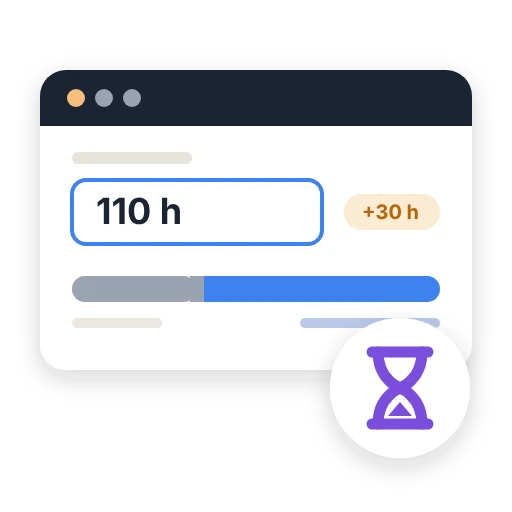
Remaining work
The number of work hours left to finish the work package, estimated by the team. It is the only value the scheduling engine reads.
The rule to remember
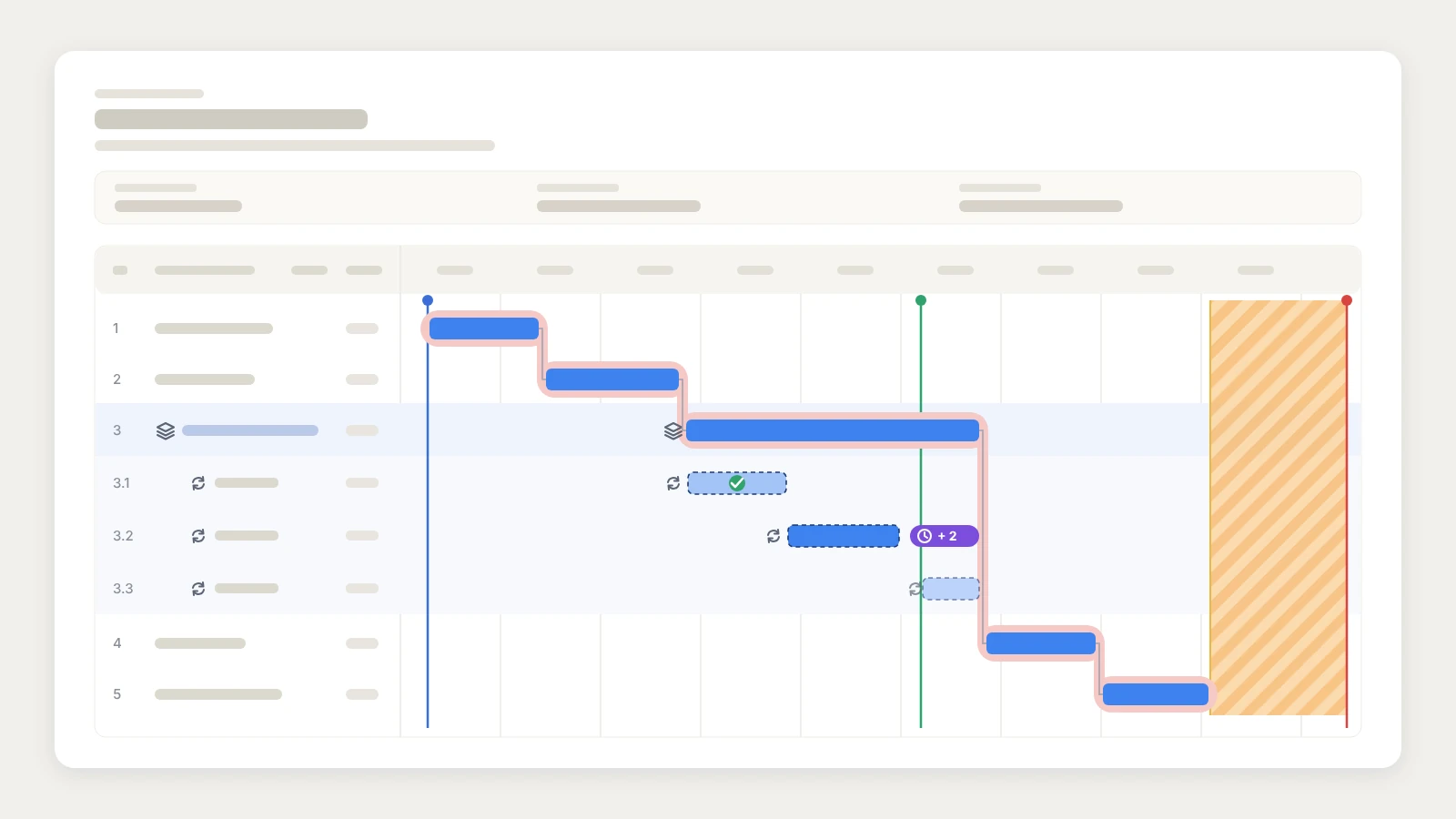
A sprint never moves the schedule. Its dates set the team's rhythm and appear on the Gantt chart, but the Critical Chain engine does not read them. Only one thing moves the work package: the remaining work entered by the team, requested at every sprint closure.
Why this design? Because it is the only way to respect both methods at once. The sprint keeps its fixed length, as Scrum intends. The project date stays protected by the buffer, as Critical Chain intends. And the original estimate is never recalculated: only the remaining work is updated, which is the very principle of Critical Chain tracking.
In practice: an IT project, sprint by sprint
Take a team of six people building a client portal for a manufacturer. Go-live is promised for March 15. The project includes:
- scoping and mockups, well understood: these are classic tasks;
- feature development, whose content will take shape through demos: this is an Agile work package, estimated at 120 hours of work;
- acceptance testing and go-live, classic tasks again;
- the project buffer, protecting the March 15 date.
- 1
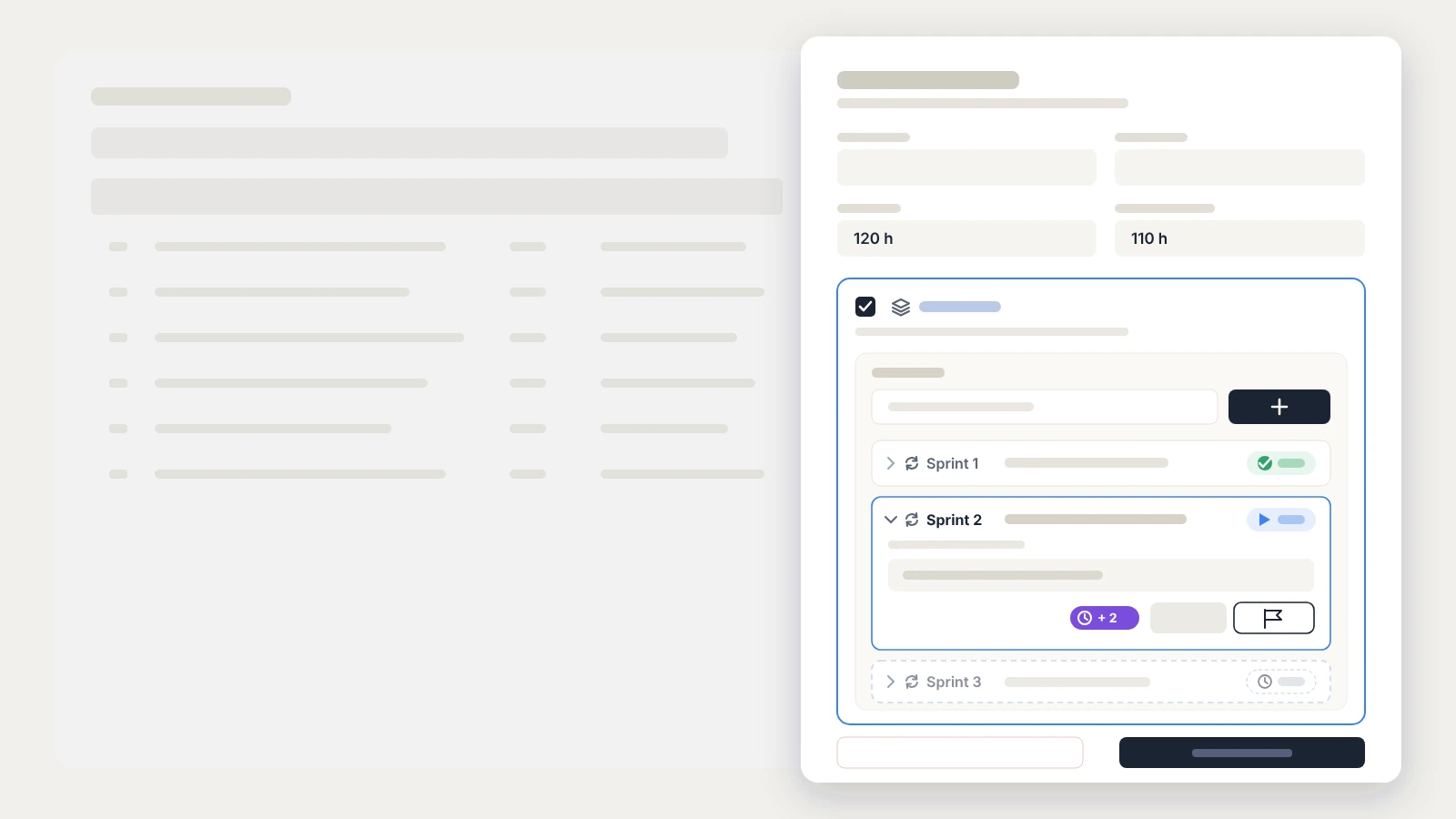
In the "Feature development" task sheet, check the "Agile" box. Duration and remaining work keep their current values. Existing items are kept, but no new ones can be added afterwards: the detailed backlog lives in the team's own tool.
- 2
In the "Sprints" section, enter the goal ("Login and client dashboard"), then click "Create sprint". It lasts one week by default, adjustable from 1 to 4 weeks. It is Planned: its dates are calculated automatically and follow the work package if it moves.
- 3
On day one, click "Start sprint". The "Actual start" field is prefilled with the current time; you can move it back if the sprint started late. The dates are then frozen. Only one sprint can be started at a time.
- 4
During the sprint, nothing changes for the team: rituals, backlog, usual tools. If the end date passes without closure, a purple overdue-sprint badge appears with the number of days late ("+ 2 d"). One click opens the closure form.
- 5
This is the key moment, detailed below: the team answers three questions and confirms its remaining work. The schedule is recalculated from that value.
- 6
Create the next sprint from the task sheet. When the deliverable is done, the last closure says so: the work package is completed and acceptance testing can start.
Sprint closure: where the two methods meet
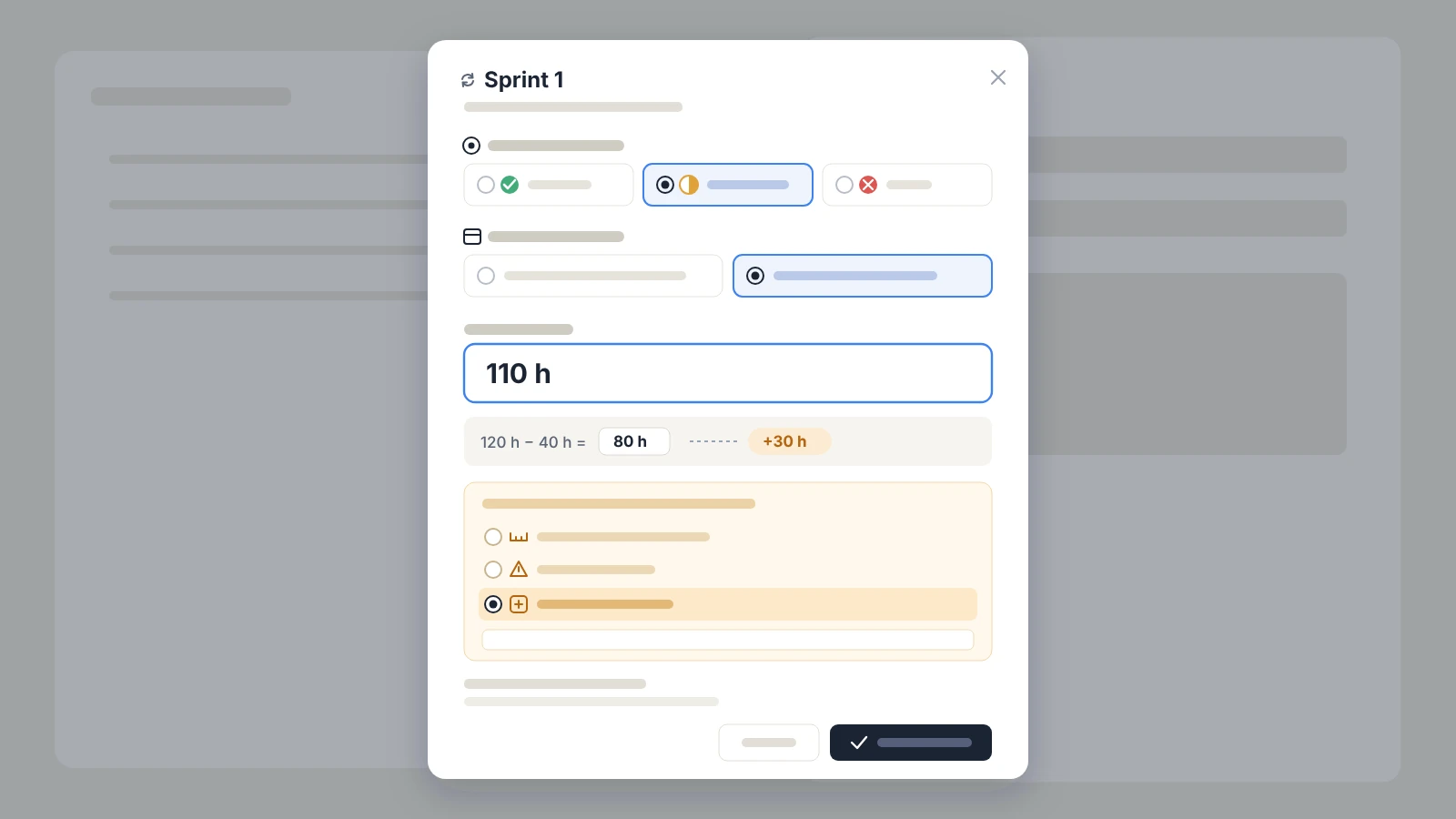
Closure is the only moment when a sprint acts on the schedule. The "Close sprint" form asks three questions, in this order.

1. Goal reached?
2. Deliverable done?

3. Why the gap?
A worked example
Back to the client portal. The task calendar has 5 days of 8 hours. Before sprint 1, remaining work on development is 120 hours.
| Step | Value | What it means |
|---|---|---|
| Remaining work before the sprint | 120 h | The team's estimate at the start |
| Working hours elapsed during the sprint | 40 h | One week on the task calendar |
| Expected value at closure | 80 h | 120 h minus 40 h: the reference if everything had gone as planned |
| Remaining work entered by the team | 110 h | The client asked for SSO login during the demo |
| Gap | +30 h | The "Scope addition" cause is selected |
The expected value is never imposed: it is a reference point. KairoProject makes no automatic subtraction, neither of the sprint length nor of checked items. Only the team's honest estimate counts.
What closure does, precisely
- 1
The sprint moves to Closed. Its record keeps the history: goal reached or not, remaining work before, after and expected, cause and comment.
- 2
The work package's remaining work becomes exactly the value entered: 110 hours in our example.
- 3
The Critical Chain engine recalculates the schedule from that new remaining work. Acceptance testing and go-live move, and the buffer absorbs the shift.
- 4
If buffer consumption rises by more than the portfolio threshold (3 points by default, adjustable), the event is recorded with the cause chosen at closure. The question is not asked again.
Time worked and remaining work are two different things
If timesheets are enabled, the form also suggests the hours worked during the sprint, prefilled from resource availability. They are to be confirmed or corrected. As the form points out, a change in remaining work measures a re-estimate, not time worked: the two never offset each other.
What the portfolio manager sees
This is where the combination shows its full value. The project director asking "are we still on track for March 15?" no longer has to wait for the retrospective.
- On the fever chart, the client portal moves after every closure: project progress is compared with buffer consumption. A green, yellow or red zone tells you immediately whether the date is at risk.
- In the portfolio's delay cause analysis, the three sprint causes are categories in their own right. After a few months, you know whether gaps come mostly from optimistic estimates, blockers or scope additions. That is not the same conversation with the client.
- The dashboard keeps pointing to the priority project, the reason and the recommended action, based on the updated schedule.
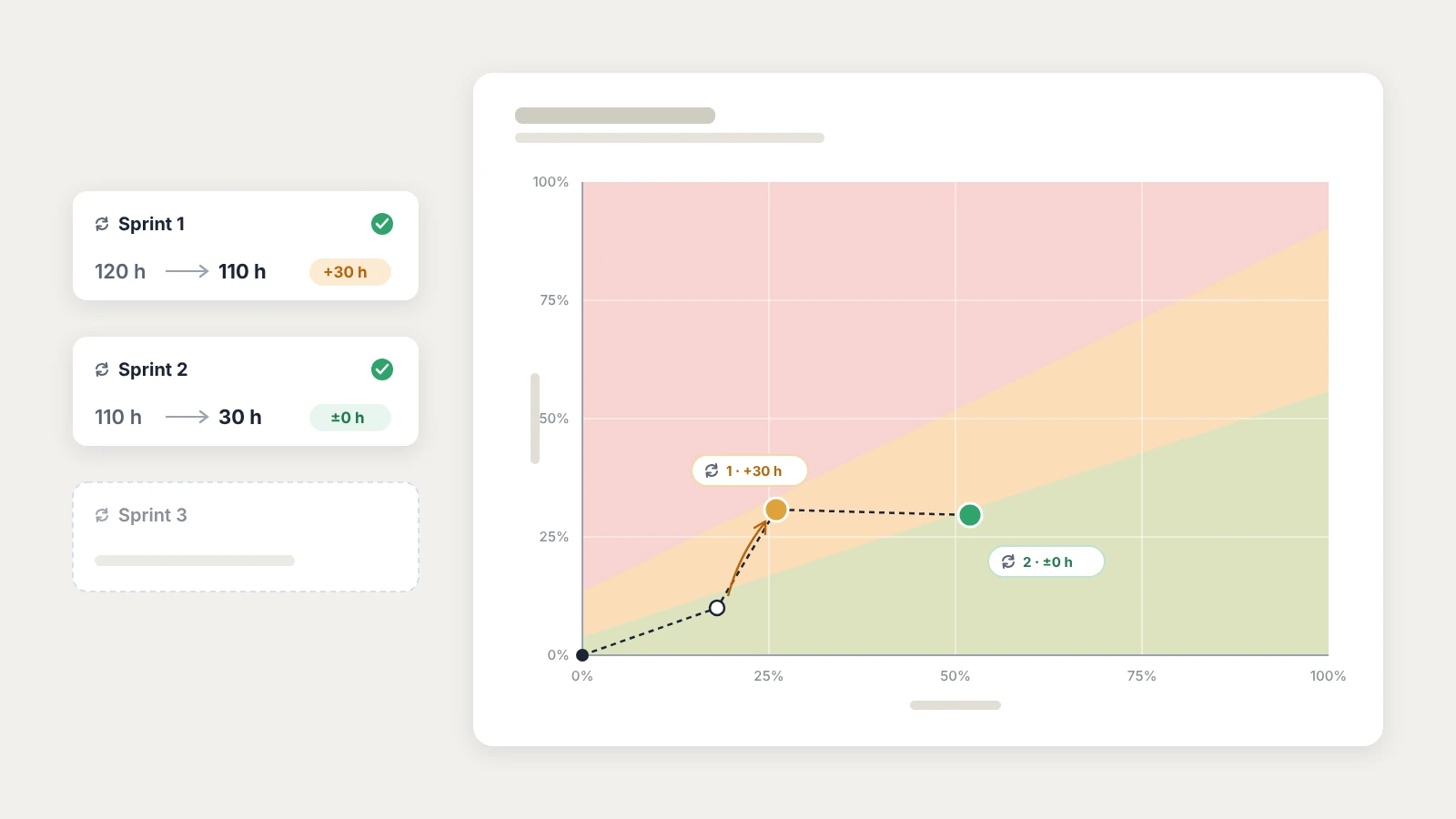
This regular link between sprint and buffer has another effect: it reduces the temptation to spread developers across three projects at once. When every sprint shows its effect on the date, priority becomes visible, and multitasking across projects is discussed on facts.
What Agile mode does not do, and why that is intentional
KairoProject does not try to replace Jira, Azure DevOps or your team's board. Its role is to connect sprint outcomes to the schedule and the portfolio. Some functions therefore stay, on purpose, in the team's delivery tool.
| Stays in the team's tool | Handled by KairoProject |
|---|---|
| Backlog, user stories, story point estimates | The work package's remaining work, in hours |
| Velocity, burndown, sprint capacity | The Critical Chain schedule, the buffer, the fever chart |
| The detail of sprint tasks | The sprint goal, its state and its closure record |
| Scrum rituals | Priority between projects and delay cause tracking |
A few rules complete this division of roles:
- no automatic creation of the next sprint: each sprint is a commitment the team creates itself;
- a closed sprint can no longer be edited: it becomes the project's reliable history;
- a work package cannot be completed while a sprint is in progress: close the sprint first;
- in the public API and MCP tools, sprints are available read-only (list, overdue sprints, closure preview), so that an AI assistant can, for example, flag the sprints waiting to be closed.
Frequently asked questions
Yes. Scrum organizes the team's work in short sprints. Critical Chain protects the project delivery date with a single buffer. The two meet at the end of every sprint, when the team honestly re-estimates the work that remains.
No. Sprint dates set the team's rhythm and are used for display. Only the remaining work entered by the team, especially at sprint closure, moves the work package in the schedule and changes buffer consumption.
No. The backlog, user stories and velocity stay in the team's delivery tool. KairoProject links the outcome of each sprint to the Critical Chain schedule and to the portfolio.
An overdue-sprint badge appears with the number of days past the end date, on the Gantt chart, the kanban boards and the task sheet. It blocks nothing: one click opens the closure form.
No. Agile mode is set task by task. A single project can mix classic tasks, such as scoping or go-live, with work packages delivered in sprints.
Try it on your next project
You do not need to change how your team works. Pick a project with a date to meet, switch its development work package to Agile mode, and close the first sprint with an honest remaining-work estimate. From the very first week, the fever chart will tell you whether the date is at risk.
Sources and further reading
- Ken Schwaber and Jeff Sutherland, The Scrum Guide (2020 edition): the official definition of sprints, the Sprint Goal and empiricism. Read the Scrum Guide (PDF)
- Eliyahu Goldratt, Critical Chain (1997): the founding book of the Critical Chain method. Available on Google Books
- Marris Consulting, accelerating IT projects by combining Agile and Critical Chain. Read the presentation (PDF)
- Wolfram Müller, A Practical Guide: How to Integrate Agile into CCPM or Vice Versa, TOCICO 2020 conference. View the presentation
Read next
- What is CCPM?: the foundations of Critical Chain.
- The CCPM fever chart: see at a glance how each sprint closure affects the date.
- Excel, Gantt, Jira… and still late: steering an IT portfolio by priorities, above Jira.
- Reducing multitasking in project teams: why a developer on three projects slows all three down.
Do you steer your projects… or endure them?
Start you diagnostic right here. You'll learn what's really holding your projects back and how to take control.
Prioritization & responsiveness
Question 1 of 12
What happens when an important new request comes in while everyone is already busy?
Newsletter
Want to go further?
Get regular, actionable takes on multi-project prioritization, the Critical Chain, shared resource constraints, and steering practices.
Read next
CCPM: The Method That Explains Why Your Projects Slip (And How to Fix It)
What is CCPM (Critical Chain Project Management)? A complete guide to the Critical Chain method: principles, mechanisms, buffers, constrained resources, and multi-project steering for SMEs and engineering firms.
The CCPM Fever Chart: The Only Graph That Tells You Where Your Project Really Stands
The CCPM fever chart turns project progress into an immediate decision signal. Learn how to read it, interpret each zone, and use it to manage your portfolio.
Excel, Gantt, Jira… and Still Late: What Changes When You Steer by Priority
Your team juggles Excel, a Gantt chart, and Jira but sprints still slip? Here's what actually changes when you steer a project portfolio by priority instead of by tool.